

A better python REPL for helix
Constantin GahrIn my last post, I showed how you can use a minimal python script and tmux to send code from within the helix editor to an ipython repl. This setup had many limitations and didn’t really work very well. This post presents my new setup that I have been using daily for the last half year.
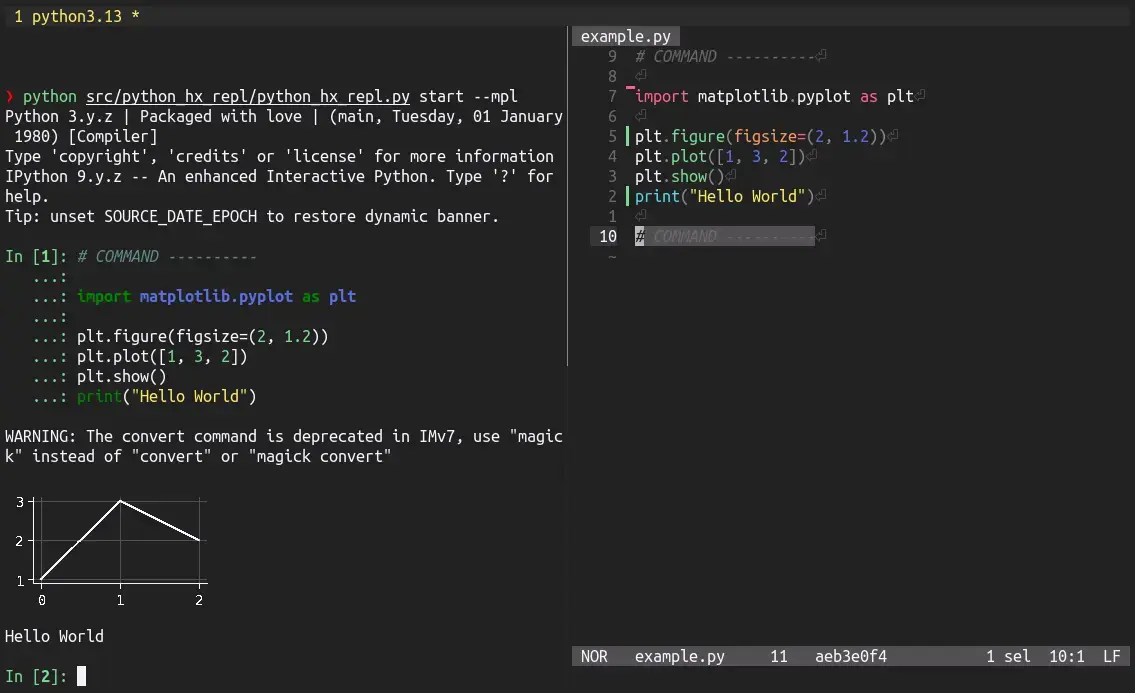
python_hx_repl send without leaving helix.My new setup consists of a ~150-line python script and does not depend on tmux anymore. The full code is available in the git repository python_hx_repl.
What changed?
Mainly, I moved away from using tmux to send the code from one pane to another. The logic was simply too complex and buggy to work as expected every time. In particular, the complexity necessary to provide multiple REPLs for different files made the main usecase of one REPL for all files very clunky to use.
Instead, I dropped the pure tmux implementation and extended on the tmux-less alternative I presented in the original post.
Similarly to before, there are two subcommands:
python_hx_repl startto start the ipython REPL with a server listening for inputs andpython_hx_repl sendto send python code to the server and execute it in the ipython REPL.
python_hx_repl start
You execute python_hx_repl start once in the terminal where you want to run the REPL. The command then starts an ipython session with a simple python socketserver in the background. The socketserver listens for text inputs sent via python_hx_repl send and, if it recieves any, executes them directly within the ipython interpreter.
Depending on if the flags --spark and --mpl are present, the command additionally sets up and provides the spark, dbutils and plt modules. The --spark functionality intends to mimic the setup done by databricks so that it is possible to execute databricks notebook as if they were run in the web. The --mpl flag instructs matplotlib to use the backend module://matplotlib-backend-sixel to display plots directly in the terminal. Additionally, it loads the monokai.mplstyle stylesheet so that the visuals match my terminal configuration (and the color style of this blog).
python_hx_repl send
Using the python_hx_repl send command, you can send python code to the server, either by specifying an explicit message via the --msg flag or by pipeing the python code into python_hx_repl send like
echo "print('Hello World')" | python_hx_repl sendThe latter works out of the box with helix using the builtin command :pipe-to.
helix keybindings
Within helix I have to keybindings to interface with python_hx_repl send. To execute the code, I use the builtin command :pipe-to to pipe the current selection into python_hx_repl send using
[keys.normal.backspace]
s = ":pipe-to python ~/bin/python_hx_repl send"
Additionally, I implemented “run the current cell and go to the next cell” by selecting between the delimeters, pipeing the selection to python_hx_repl send and going to the next delimiter:
[keys.normal.backspace]
  n = '''@\
    ""_/^#<space>COMMAND<space>----------<ret>\
    ""_?^#<space>COMMAND<space>----------<ret>\
    i#<esc>\
    "_/^#<space>COMMAND<space>----------<ret>\
    F<ret>;\
    vg.v_\
    <backspace>su\
    "_/^#<space>COMMAND<space>----------<ret>\
  '''
And that’s it!
That’s all you need for a working and useful python REPL within helix. I have been using this setup every day for more than 6 months and I couldn’t be happier. The web UI of e.g. jupyter notebooks cannot compare.
My full helix configuration contains three more helpers, but they are not essential.
[keys.normal."["]
# COMMAND ----------
n = "@\"_?^#<space>COMMAND<space>----------<ret>"

[keys.normal."]"]
n = "@\"_/^#<space>COMMAND<space>----------<ret>"

[keys.normal.backspace]
s = ":pipe-to python ~/bin/python_hx_repl send"
o = "@]<space>gjo<ret># COMMAND ----------<esc>gkgki"
n = '''@\
  ""_/^#<space>COMMAND<space>----------<ret>\
  ""_?^#<space>COMMAND<space>----------<ret>\
  i#<esc>\
  "_/^#<space>COMMAND<space>----------<ret>\
  F<ret>;\
  vg.v_\
  <backspace>su\
  "_/^#<space>COMMAND<space>----------<ret>\
'''